

Description
Download Hologram Piano Simulator – hologram piano, virtual piano, piano simulator, prank app, LED piano, music app, fun app, novelty app, Android app
Overview
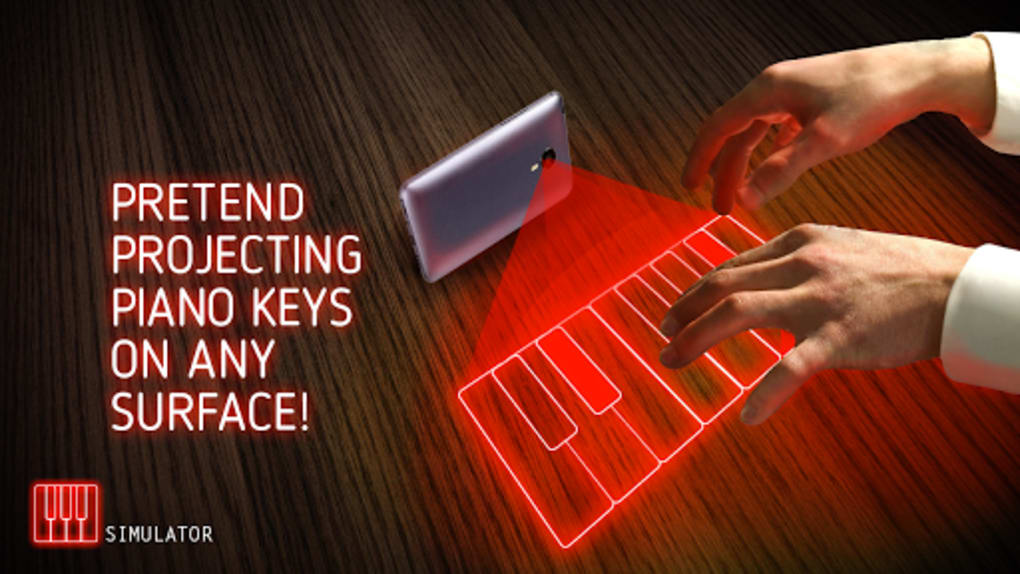
The Hologram Piano Simulator is a novelty Android application designed to entertain and amuse users through a visually striking simulation of a futuristic piano interface. Leveraging the phone’s LED flash, the app creates the illusion of a holographic keyboard projected onto a surface, enhancing the visual experience with dynamic red LED lighting and vivid graphics. While it does not generate a true 3D hologram, the app aims to replicate the aesthetic of advanced projection technology for playful and social engagement. It is intended for casual users, pranksters, and entertainment seekers rather than professional musicians or serious music learners. The app provides pre-loaded melodies and customizable color schemes, allowing users to tailor the visual and auditory experience to suit their mood or audience. It is particularly suited for social settings where the goal is to impress friends or spark conversation with a seemingly high-tech musical device. The developer, KarApps, positions this as a fun, lightweight tool for recreation, not a functional instrument for training or performance. Its small file size and free pricing model make it accessible for quick downloads and spontaneous use.
Key Features & Capabilities
- LED Flash-Based Visual Simulation – Uses the phone’s LED flash to mimic a holographic projection effect, creating a glowing keyboard illusion on surfaces.
- Dynamic Lighting Effects – Features vibrant red LED animations that respond to key presses, enhancing the futuristic aesthetic.
- Pre-Loaded Melodies – Includes a selection of popular tunes and jingles to help users simulate playing complex pieces without actual musical skill.
- Customizable Visuals – Offers a range of color options and visual styles to personalize the piano’s appearance, from traditional to modern electronic looks.
- Sound Effects and Audio Feedback – Delivers realistic piano and keyboard sounds with responsive audio feedback for each key press.
- Headphone-Friendly Practice Mode – Allows quiet practice sessions without disturbing others, ideal for home or public use.
These features combine to create an immersive experience that prioritizes entertainment over functionality. The app enables users to simulate playing piano-like music in social settings, making it a popular choice for pranks, parties, or casual fun. The visual effects and sound design work together to reinforce the illusion of a high-tech instrument, even though the simulation is entirely screen-based. While it does not support MIDI, recording, or advanced music editing, its core purpose is to entertain and engage users through novelty. The inclusion of pre-loaded melodies helps users quickly produce recognizable tunes, reducing the learning curve and increasing the app’s accessibility for non-musicians.
User Interface, Workflow & Performance
The user interface of Hologram Piano Simulator is designed with simplicity and visual impact in mind. The main screen displays a stylized piano keyboard with glowing keys, illuminated by dynamic LED effects that respond to user input. Navigation is minimal, relying on direct interaction with the keys to trigger sound and light responses. The workflow is straightforward: launch the app, position the phone to project the light onto a surface, and begin playing. The app does not include complex menus or settings, which contributes to a seamless and intuitive experience. Users can switch between visual themes and select melodies through a basic in-app menu, though specific details about the interface layout were not provided. Performance appears to be optimized for smooth operation, given the app’s small size and focus on visual and audio feedback. The developer did not specify resource usage details, but the lightweight nature suggests low CPU and RAM consumption. Stability is expected to be consistent for basic use, though extended use may vary depending on device capabilities. The app does not require internet access, ensuring offline functionality and consistent performance across different environments.
Compatibility & System Requirements
Hologram Piano Simulator is designed for Android devices and is compatible with the latest versions of the operating system. The app has a file size of 14.2 MB, making it suitable for devices with limited storage. It requires a phone equipped with an LED flash to enable the core holographic simulation feature. The developer did not specify exact hardware requirements beyond the presence of an LED flash. Compatibility information was partially provided, and no additional system specifications were listed. Users should ensure their device supports the necessary camera and flash functions for optimal performance. The app does not require root access or special permissions beyond basic camera and audio usage. It is available for free, which increases accessibility across a wide range of Android devices. For users with older or low-end Android phones, performance may vary, though no specific limitations were noted in the provided information.
Pros and Cons
Pros
- Lightweight and fast to download (14.2 MB)
- Free to use with no in-app purchases
- Unique visual simulation using LED flash for a holographic effect
- Simple and intuitive interface for immediate use
- Includes pre-loaded melodies for easy entertainment
- Headphone support for private practice sessions
- Customizable colors and visual styles for personalization
Cons
- Does not produce real 3D holographic projections
- Not suitable for serious music practice or training
- Requires a phone with an LED flash for full functionality
- Visual effects depend on ambient lighting conditions
- Limited to Android platform
- App is designed solely for novelty and entertainment
FAQ Section
Is Hologram Piano Simulator available for iOS devices?
The app is currently available only for Android. No information was provided regarding iOS compatibility or future release plans.
Does the app require internet access to function?
No, the app operates entirely offline. All features, including sound effects, visual simulations, and melodies, are included within the application.
Can I use this app for actual piano lessons?
No, the app is intended for entertainment and novelty purposes only. It does not support music training, note recognition, or advanced learning tools.
Is the hologram effect real or just a screen animation?
The hologram effect is simulated using the phone’s LED flash and screen display. It creates the illusion of a projected keyboard but does not generate a true 3D hologram.
How often are updates released for this app?
The developer did not specify an update schedule. Users are advised to check the app store for the latest version, which is currently version 1.0.1.
Final Thoughts + CTA
Hologram Piano Simulator delivers on its promise as a fun, visually engaging novelty app for Android users. While it doesn’t offer the functionality of a real piano or professional music software, it excels in creating an entertaining experience that can impress friends and spark laughter. The combination of LED lighting, responsive sound effects, and customizable visuals makes it a standout choice for pranksters, partygoers, and casual users. Its lightweight design and free availability enhance its appeal. However, it is important to recognize its limitations: it is not a tool for serious music education or performance. For those seeking a lighthearted way to simulate playing piano in a futuristic setting, this app is a solid choice. Download Hologram Piano Simulator now and bring a touch of digital magic to your next gathering.
Guides & Tutorials for Hologram Piano Simulator
How to install Hologram Piano Simulator
- Click the Preview / Download button above.
- Once redirected, accept the terms and click Install.
- Wait for the Hologram Piano Simulator download to finish on your device.
How to use Hologram Piano Simulator
This software is primarily used for its core features described above. Open the app after installation to explore its capabilities.
User Reviews for Hologram Piano Simulator 0
No reviews found





